
GammaCrop v1.6: Faster, Smarter Background Removal
We upgraded GammaCrop's AI background removal from a single large model running on CPU to a multi-model system with WebGPU hardware acceleration. Here's what changed, why, and what we learned.
The Problem
GammaCrop v1.3 introduced AI background removal using BRIA's RMBG-1.4 model, running entirely in the browser via WebAssembly. It worked — but it had real pain points:
- 176MB download on first use — brutal for users on slow connections
- Slow inference — WebAssembly (CPU-only) meant waiting 10-30 seconds on most machines
- Desktop only — too heavy for mobile browsers
- One model fits all — no way to trade quality for speed on simple images
The Landscape: Free Browser-Based BG Removal
Before building our own upgrade, we surveyed what’s available. Reddit threads and product forums consistently recommend a handful of free, privacy-first background removal tools. Here’s what we found:
| Tool | Processing | Models | Modes | GPU | Notes |
|---|---|---|---|---|---|
| bgremovefree.com | Local | u2netp, silueta, RMBG-1.4 |
4 | WebGPU + WASM | Best multi-model design. Inspired our approach |
| remove-bg.io | Local | ONNX (unspecified) | 1 | WASM | Free HD, no sign-up, clean UI |
| nobg.space | Local | ONNX / WASM | 1 | WASM | Full-resolution, lossless. Reddit favorite |
| bgsub.com | Local | Undisclosed | 1 | Unknown | Privacy-first, high-res support |
| rmbg.fun | Local | U2net, Modnet, RMBG-1.4, Silueta |
4 | WASM | Open source, works offline, desktop app available |
| remove.bg | Server | Proprietary | 1 | N/A | Industry standard. Uploads images, free tier limited |
The standout was bgremovefree.com — it offers four modes using different models, all running locally with WebGPU acceleration. Their Fast mode produced near-instant results that rivaled server-based tools. That was the “aha” moment: you don’t need a giant model for every use case.
Why We Chose MODNet + RMBG-1.4
After testing the models used across these tools, we settled on two:
- MODNet (
Xenova/modnet, ~24MB) — fast, reliable, and publicly available on Hugging Face without authentication. Produces clean edges on product photos. Several models we tried (u2netp,siluetaunderonnx-community) turned out to be gated or broken — MODNet just works. - RMBG-1.4 (
briaai/RMBG-1.4, ~176MB) — the same model we used since v1.3, but now running on WebGPU instead of WebAssembly. The difference is dramatic: on CPU/WASM, RMBG-1.4 produced noisy edges and missed fine details; on GPU, the same model delivers clean, professional cutouts. Kept as the HD option for complex subjects like hair and fine textures.
Real-World Results
To see the difference in action, we tested the new engine with a complex photo of our ArcadeDock stand. The “Legacy Engine” below is RMBG-1.4 running on WASM/CPU (v1.5) — the same model, but a completely different result once we switched to WebGPU.
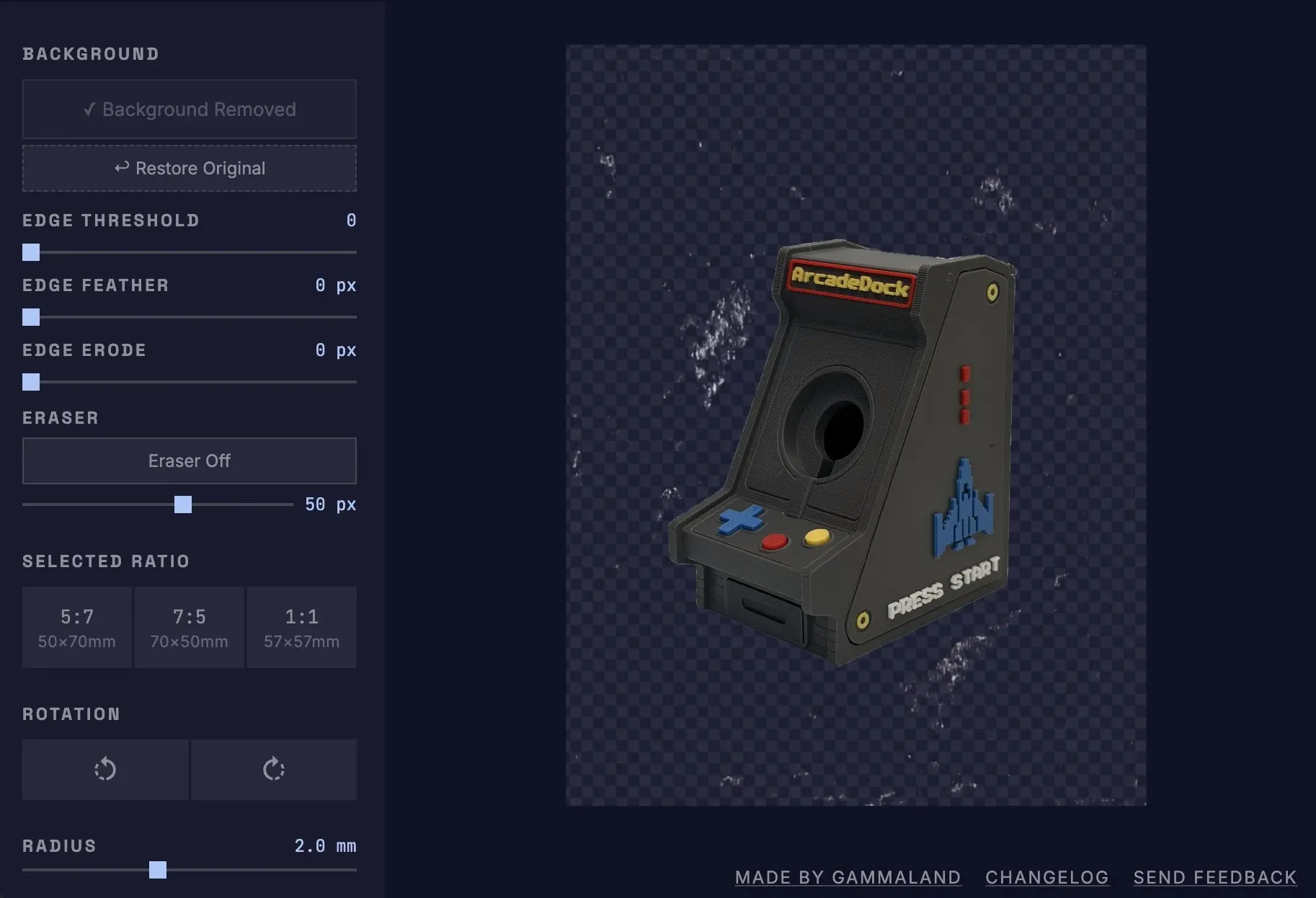
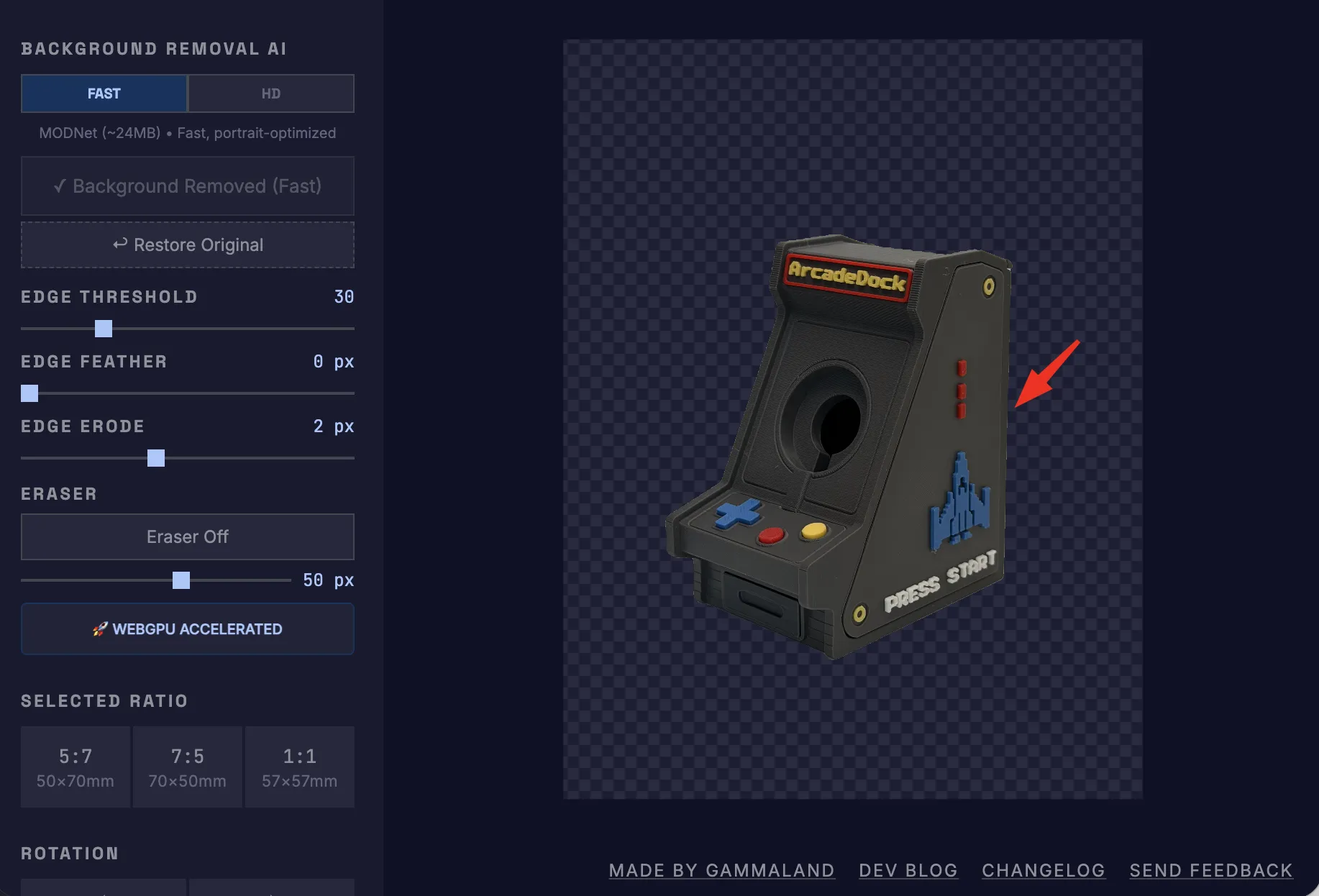
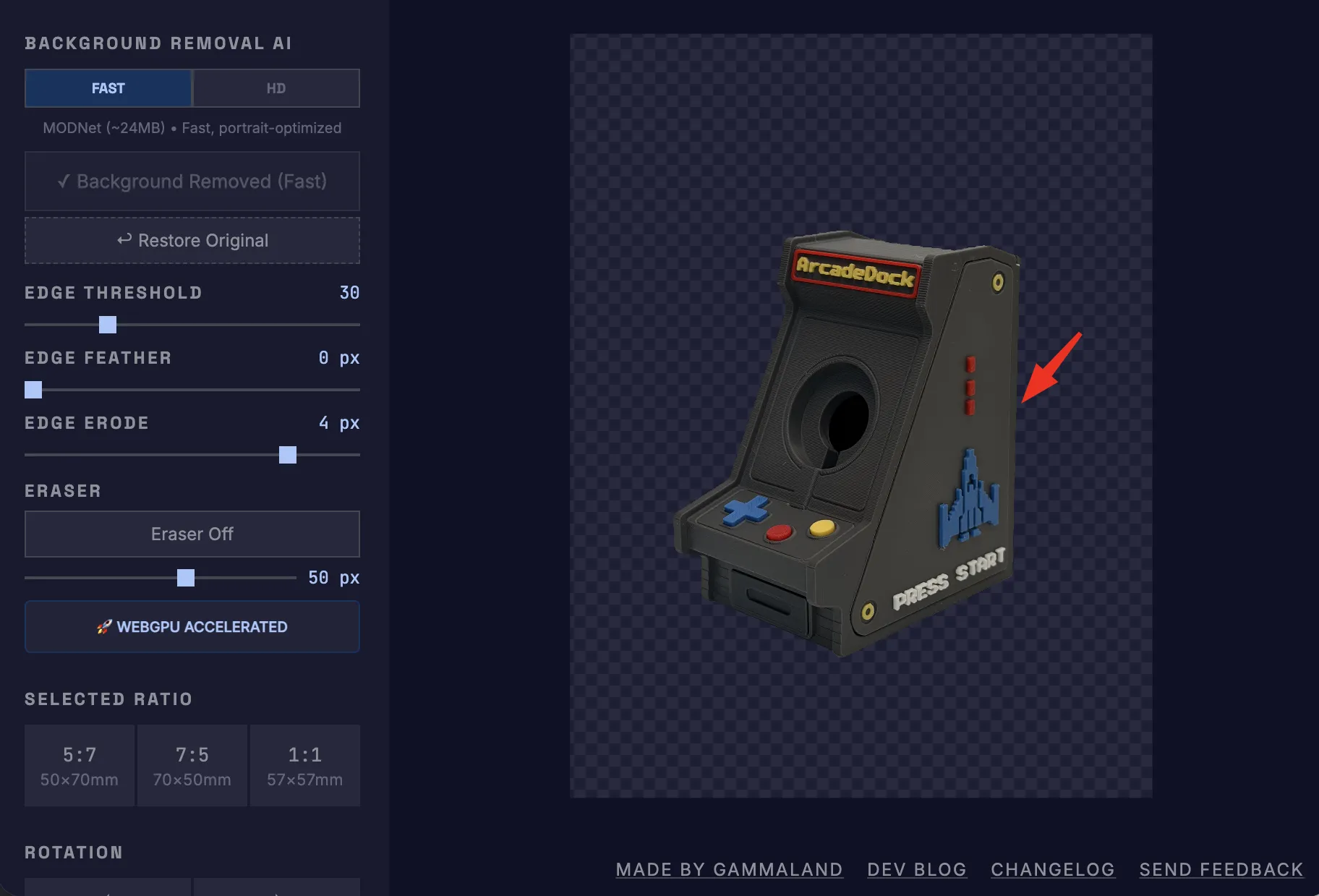
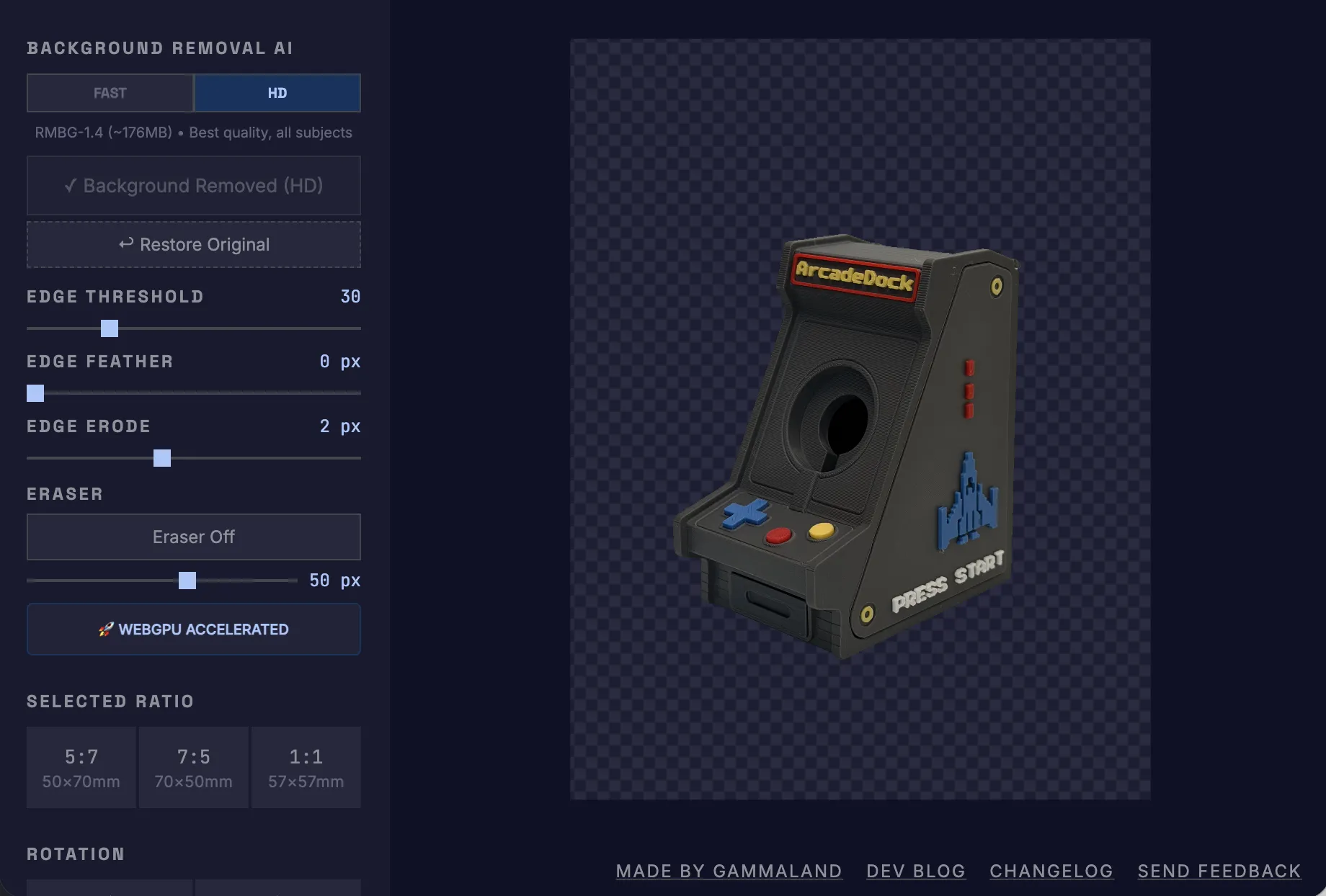
The conclusion is clear: use Fast for quick edits and mobile use (with optional desktop refinement), or switch to HD when you need maximum quality without touching a single slider.
What We Changed
1. Multi-Model Architecture
Instead of forcing every user through a 176MB download, we now offer two modes:
| Mode | Model | Size | Best For |
|---|---|---|---|
| Fast | MODNet (Xenova) | ~24 MB | Products, portraits, simple backgrounds |
| HD | RMBG-1.4 (BRIA AI) | ~176 MB | Complex edges, hair, fine textures |
2. WebGPU Hardware Acceleration
The biggest performance leap came from switching the inference backend. Instead of running everything on CPU via WebAssembly, we now auto-detect WebGPU and use the user’s GPU for AI inference.
No WebGPU? → Fallback to WebAssembly (still works)
Browser support: Chrome 113+, Edge 113+, Safari 26+
Smaller model + GPU = background removal that used to take 20+ seconds now takes 2-3 seconds.
3. Mobile AI Background Removal
With MODNet at ~24MB, mobile is no longer blocked. AI background removal works on phones and tablets. Edge refinement controls (threshold, feather, erode, eraser) remain desktop-only since they require precise cursor interaction.
Technical Insights
- Model availability matters. Several models on Hugging Face are gated or have broken ONNX exports. We stuck with
Xenova/modnetandbriaai/RMBG-1.4— both public and well-tested with Transformers.js v3. - Pipeline API vs. AutoModel. The high-level
pipeline('background-removal')API didn’t work reliably across all models.AutoModel+AutoProcessorgave more consistent results. - Smaller ≠ worse. MODNet’s 24MB model produces cleaner results than RMBG-1.4 on many product photos. The “best” model depends on the input.
- Cache by mode. We cache each model’s mask separately. Switching between Fast and HD after both have run is instant — no re-inference.
💡 Key Takeaway
Don’t assume bigger models are always better. A 24MB model with GPU acceleration beats a 176MB model on CPU — in both speed and perceived quality — for the vast majority of use cases.
Join the Conversation
Struggling with clean cutouts for your magnet prints? We share tips on achieving the perfect edge in our Reddit post.
Try It
GammaCrop v1.6 is live now. Upload an image, select Fast or HD, and remove the background in seconds — all in your browser, no uploads, no sign-up.